Mojo: Reels and Video Captions
- 4.5
- Rating
- 10.00M
- Installs
- Free
- Price

 Analysis by App-foxy
I spent time with Mojo: Reels and Video Captions as a mobile photography and social-content app, and my first impression was that it is less about replacing a full desktop editor and more about helping me turn ordinary clips and photos into something ready to share. Its main appeal is speed: I can begin with a short video, a group of images, or a social post idea and move toward a finished layout without building every visual element from scratch.
That convenience matters because most people do not need a complicated production suite for a daily post. They need readable captions, a decent rhythm between images, and a format that looks intentional on a phone screen. Mojo focuses on that practical middle ground. It is free to install, suitable for Everyone, and developed by Dailymotion Inc. The app has reached over 10 million installs and holds a 4.5 average from around 243 thousand ratings, which gives me useful context: it is established enough to have a broad user base, but that popularity does not remove the need to check how comfortably its controls and paid choices fit my own habits.
What using Mojo feels like in everyday work
The workflow is built around social content rather than traditional photography management. I would open it when I wanted to make a quick vertical video, add text that stays legible over moving footage, assemble a story, or combine several pictures into a collage. The store summary describes it as an all-in-one social content maker with auto subtitles, video editing, stories, and collages, and that combination accurately reflects its role. It is a creation tool for presentation and publishing, not a replacement for a camera app, a photo library, or a serious color-grading program.
You May Also Like

 Blood Strike: 2.5 Anniversary
Blood Strike’s Loadouts Turn Every Drop Into a Tactical Gamble
A close look at Blood Strike’s custom loadouts: how fast access to signature weapons reshapes its battle royale rhythm, rewards preparation, and narrows the gap between fights.

 Pandora - Music & Podcasts
Pandora’s Music Is Easy to Start, but Harder to Recover
Pandora’s strength is its low-effort path from a seed to a station. Its weak spot is how much confidence it asks you to place in connection, setup, and quiet recovery.

 8 Ball Pool
 Is Built on Rivalries, Rematches, and Routine
A close look at the rivalries, rematches, shared routines, and unanswered safety questions that turn a quick pool match into a persistent mobile community.

 Samsung Music
’s Quiet Strength Is Playing What You Already Own
Its reach comes less from spectacle than from dependable access to a personal library. That simplicity is both the app’s strongest retention engine and its ceiling.

 AccuWeather: Weather Radar
AccuWeather Review: A Quick, Clear Forecast for Everyday Decisions
For everyday plans, the best forecast is the one you can understand quickly. AccuWeather makes rain timing, radar, and local conditions easy to act on, with a few trade-offs.

 Hill Climb Racing
Why Hill Climb Racing Still Turns Crashes Into One More Run
A tiny car, a bumpy hill and one more upgrade: Hill Climb Racing keeps resurfacing because its simple chaos makes every near-miss feel personal.
More From Our News Desk



For a realistic example, imagine I have recorded a short clip at a local event and taken three still photos. In a conventional editor, I might spend time choosing a canvas, arranging the images, finding a typeface, and timing text manually. In Mojo, I can start from a prepared visual direction, place the material into it, and then concentrate on the message. That is the strongest reason I would recommend trying it: it reduces the number of small design decisions that usually stop a casual creator before the post is finished.
The same workflow can help a small shop, a club, or a person promoting a side project. A product photo can become a short story sequence, while a spoken clip can be made more accessible with captions. I would still review every word and every transition before sharing. Automated assistance is useful for getting close, but it should not be treated as an editor that understands context, names, accents, or specialist vocabulary perfectly.
Templates save time, but they also shape the result
The most important trade-off is the one I see with almost every template-led editor: speed comes from accepting a visual framework. That framework can make a post look polished quickly, but it can also make several accounts feel alike if I use the first attractive option without changing anything. My practical advice is to treat a template as a starting arrangement rather than a finished identity. Replace the sample wording, check the pacing against the actual footage, and remove decorative elements that do not support the message.
This is especially important for captions. Text that looks balanced in a preview may cover a face, a product detail, or a sign once the real video is inserted. I would watch the complete result before exporting rather than judging only the editing screen. A short pause can also change whether a caption feels helpful or distracting. Mojo is at its best when I use its prepared structure to make decisions faster, not when I let the structure make every decision for me.
Collages bring a similar issue. They are useful when the relationship between images is clear, such as showing several details of one item or summarizing an event. They are less effective when I force unrelated pictures into one frame simply because the layout has empty spaces. The app makes assembly easier, but it cannot decide whether the chosen images tell a coherent story. That judgment remains mine.
Captions are useful only after a careful human check
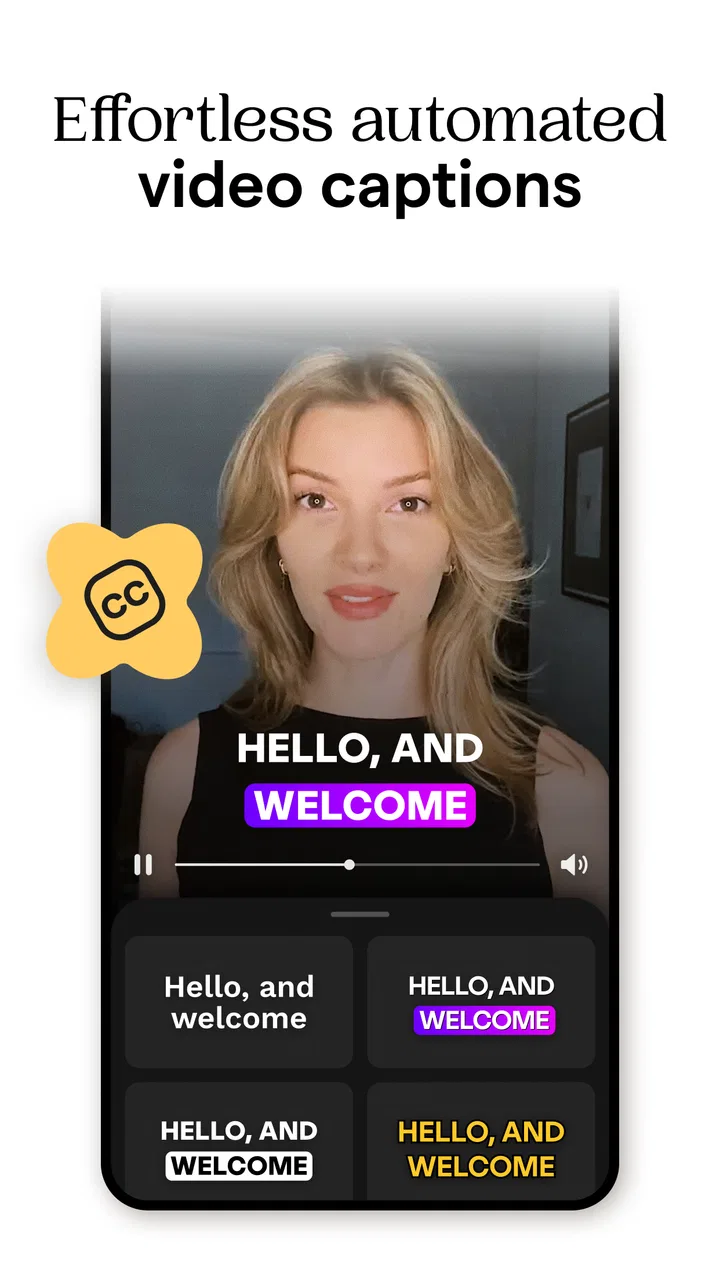
Auto subtitles are one of the features I would use most often for short spoken clips. Captions can make a video easier to follow when sound is off, which is common in casual browsing, and they can help viewers who prefer reading along. They also give a talking clip more visual movement than a plain block of text.
My caution is simple: generated text needs proofreading. A name, place, product term, or sentence spoken quickly can be misread. I would also check punctuation and line breaks, because technically correct words can still be hard to read if they appear in awkward groups. If the app offers styling choices, restraint is usually better than filling every frame with animation. The goal is to support the speaker, not compete with them.
There is another useful workflow here. I would first trim the video to its final length and only then refine the captions. Editing the clip afterward can shift timing or make a caption linger too long. Doing the structural cut first reduces that rechecking work. This is a small habit, but it makes the app feel considerably more efficient during repeated projects.
Where the app fits beside familiar alternatives
Compared with a basic phone editor, Mojo offers a more deliberate visual starting point. The usual built-in editor is often better for simple trimming, rotation, cropping, and quick adjustments, especially when I want to keep a video private and finish it with minimal decoration. Mojo becomes more valuable when the post needs a designed layout, multiple media elements, animated text, or a story-like sequence.
Compared with a professional editor, it is easier to approach but less suited to detailed control. If I need precise audio mixing, complex masking, extensive color work, or a long-form timeline, I would choose a more specialized tool. Mojo is not trying to be that kind of application. Its advantage is the short path from raw material to a social-ready composition; its limitation is that the same shortcut can feel restrictive when I already know exactly how every layer should behave.
It also occupies a different space from a photo editor. A photo editor is usually the better choice for correcting exposure, removing distractions, or making careful adjustments to one image. Mojo is more useful after those basic images or clips are ready and I want to package them into a visual message. I would often use a camera or photo tool first, then bring selected material here for presentation.
Trust starts with visible choices, not assumptions
When I review an app that handles personal photos and videos, I pay attention to the moments where it asks me to choose something: selecting media, starting a project, saving an output, or moving toward a paid option. Those are the points where I want clear labels and an understandable path back. I do not treat a polished interface as proof of a particular privacy practice, and I would not infer permission behavior or data handling beyond what the app visibly explains on my device and in its current notices.
That approach is important with Mojo because the material I might import can be personal: family images, customer content, location clues, or recordings that include other people. Before granting access, I would review the operating system’s permission prompt and choose the narrowest option that still supports the project, when such a choice is offered. I would also avoid importing sensitive material merely to experiment with a template. A creative app should make experimentation easy, but I remain responsible for what I place inside it.
Account controls deserve the same attention. If I sign in, I would look at the available profile and account settings before uploading a large collection of work. I would want to understand how to leave an account, change access, or remove content through the controls presented to me. I would not assume that deleting a project, uninstalling the app, or signing out all mean the same thing. Those actions can have different effects, so I would use the app’s own visible options and current privacy information rather than guessing.
Paid choices and the point where I would slow down
Mojo is free, but it includes in-app purchases ranging from $9.99 to $39.99 per item. That makes the upgrade path a meaningful part of the experience, even if I only intend to use the free tools. I would check the label on any locked template, effect, or editing option before investing time in a project built around it. Discovering a restriction at the export stage is frustrating, particularly when the design has already become central to the post.
I would also distinguish between a one-time purchase screen and any recurring commitment shown by the store or the app. The exact wording and options matter more than the presence of a payment prompt. My habit is to pause, read the purchase screen, and confirm which account controls the transaction. If I am testing the app for a single event, I would avoid designing the entire campaign around paid material until I know that the cost and access terms suit me.
This is not a criticism unique to Mojo; template-based creative apps often use premium content to separate the quick start from the broader library. Still, it affects my recommendation. Someone who wants occasional captions and simple collages may find the free experience sufficient, while someone expecting unrestricted access to every polished design should inspect the upgrade choices early rather than assuming that “free” means every tool is included.
Small workflow habits that improve the result
I found that the quality of the final post depends more on preparation than on adding more effects. I would select the strongest clips before opening a project, keep the opening moment clear, and write the main message in plain language. When several images are involved, I would order them as a beginning, middle, and end instead of arranging them only by visual similarity. That gives the collage or story a purpose.
I would also keep a clean original copy of every important photo and video outside the project. Creative edits are easier to redo when the source material is untouched. For work involving other people, I would confirm that I have permission to use their image or voice before turning it into a public post. The app can help me assemble content, but it does not replace that responsibility.
Another practical tip is to preview the result on the smallest screen I regularly use. Text that looks comfortable on a large phone can become crowded elsewhere, and a busy background can reduce contrast. I would check captions against bright and dark sections of the footage, then shorten wording when the screen feels overloaded. A shorter caption that can be read once is usually more effective than a complete sentence that viewers must pause to decode.
For repeated publishing, I would create a personal routine rather than relying on random template choices. I might keep one visual approach for announcements, another for behind-the-scenes clips, and a simpler one for photo collages. This gives the account some consistency while still letting each post fit its subject. Mojo makes that experimentation approachable, but consistency comes from my decisions, not automatically from the app.
Who should use it, and who should skip it
I think Mojo is a good fit for people who regularly make short social posts but do not want to learn a complex timeline editor. It is particularly appealing if I need captions, story layouts, or collages and care more about finishing quickly than controlling every technical detail. Beginners can get a designed result without first studying motion graphics, while experienced casual creators can use the templates as a faster first draft.
I would be more cautious about recommending it to someone who mainly wants private photo correction, file organization, or advanced video production. Those needs point toward different tools. I would also skip it for projects where exact brand control is essential unless I have tested the available editing flexibility first. A template can provide a strong foundation, but it may not reproduce a carefully specified identity, layout system, or animation style.
People working with confidential footage should make their own careful decision after reviewing the current permission prompts, account settings, and privacy explanations. I would not upload sensitive material simply because the editing process is convenient. For ordinary social content, the app is easier to assess; for private client work or personal records, I would take the extra time to understand every visible choice before starting.
My verdict after weighing convenience against control
Mojo succeeds because it targets a real problem: turning a rough idea into a presentable social post without making me build the design from zero. The combination of video editing, auto subtitles, stories, and collages gives it a clear everyday purpose, and the free entry point makes it easy to test. Its current version is 3.27.0, and the app is available for devices running version 10 or later of its supported mobile operating system, so compatibility is worth checking before I plan a project around it.
My recommendation is positive, with conditions. I would choose it for quick vertical content, captioned clips, event recaps, and image sequences where a polished structure matters more than deep manual control. I would not choose it as my only tool for professional post-production, detailed photo retouching, or sensitive material that requires a carefully verified workflow. I would also inspect premium labels and account choices before committing time or money.
In the end, I see Mojo as a practical design shortcut rather than a magic content machine. It helps me move faster, but the best results still come from selecting better source material, proofreading captions, checking readability, and making deliberate decisions about what I share. If that balance sounds right to you, this Photography app is worth trying; if you want complete technical control or a simple private editor, a more focused alternative will probably serve you better.
FAQs for Mojo: Reels and Video Captions
01What is Mojo: Reels and Video Captions used for?
Mojo is a mobile content-creation app designed for making polished social media stories, reels, short videos, and promotional posts. It provides animated templates, text effects, transitions, music options, stickers, and editing tools that help users create professional-looking content without advanced video-editing experience. It is especially useful for Instagram, TikTok, YouTube Shorts, and small-business marketing.
02Is Mojo suitable for beginners without video-editing experience?
Yes. Mojo is built around ready-made templates and a straightforward editing workflow, so beginners can usually create a complete video by selecting a design, adding photos or clips, changing the text, and exporting the result. More experienced users can also customize colors, timing, fonts, animations, and layouts. However, some advanced controls and premium designs may require extra exploration or a paid subscription.
03Is Mojo: Reels and Video Captions free to download and use?
Mojo can generally be downloaded for free, but the free version may include limitations such as premium templates, design elements, export options, or branded content. The exact features available can change with app updates and subscription plans. Before starting a trial or subscribing, users should carefully review the in-app pricing, renewal terms, and cancellation instructions shown on their device.
04Can videos created in Mojo be exported for Instagram, TikTok, and other platforms?
Yes. Mojo is primarily designed for social media content and supports formats suitable for platforms such as Instagram Stories, Instagram Reels, TikTok, and similar vertical-video services. Users can typically export finished projects to their device or share them directly through supported apps. Export quality, resolution, watermark behavior, and available formats may depend on the selected template and account plan.
05Does Mojo include automatic captions or only animated text templates?
Mojo focuses heavily on animated text, captions, and visually styled templates, allowing users to add engaging titles and text overlays to their videos. Depending on the current app version and supported features, caption-related tools may not work exactly like a full automatic speech-to-text editor. Users who need highly accurate spoken-word transcription should check the latest feature description and test caption editing before committing to a subscription.
Pros
- Large library of templates for Reels
- Stories
- and social posts.
- Animated text styles make captions more eye-catching.
- Simple timeline editing suits beginners and quick projects.
- Regular template updates help keep content feeling fresh.
- Exports are optimized for popular social media formats.
Cons
- Many premium templates and effects require a subscription.
- Some exports may include branding on the free plan.
- Advanced audio and video controls are relatively limited.
- Template-heavy editing can make projects look less original.
- High-resolution exports may take longer on older devices.

Mojo: Reels and Video Captions
Gallery